
Sign Up for Small Cell/Micro Cell Permit Email Notifications
Are you curious to learn more about small cell/micro cell permit applications near you? You can also register for email notifications so you're aware of new applications being submitted for review.
1. View the BuildingEye Map
We use a third-party application called BuildingEye to map permits and applications for permits.
2. Sign up for a free account
The “Sign Up” button is at the top-right of the map
3. On the map view, click “Alerts” (you may need to click “Continue” to get to the map view).
The “Alerts” button is at the top-left of the map
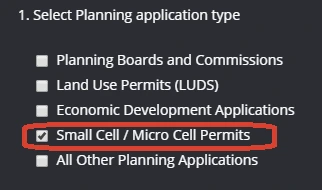
4. Un-check all of the application types other than “Small Cell / Micro Cell Permits”
If you'd like to get alerts for additional permit types, you can leave those types checked.
5. Click “Drop Pin” and drag the pin to the place on the map where you would like to receive alerts
We'll send you alerts when there are new applications near your pin.
6. Name your alert
You'll need to give your alert a name (example: small cell near home). Then click “Save Alert”
Contact Us
BuildingEye Questions
616-456-4100
General Small Cell Questions
616-456-3235


